
Description
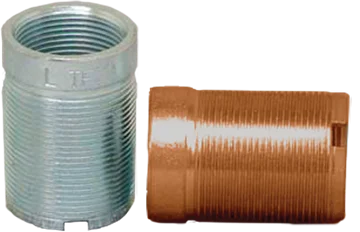
The Phoenix USA N252 N552 Stud Extender Left Thread (PN52080LTX) is a crucial component designed specifically for use with Phoenix USA N252 and N552 series wheel simulator kits. This stud extender features a left-hand thread and is essential for providing adequate thread length to securely mount these wheel simulators onto your vehicle’s wheels. Crafted with precision and durability in mind, this extender ensures a safe and reliable attachment of your wheel covers, enhancing the appearance of your vehicle.
KEY FEATURES AND BENEFITS:
- Precise Compatibility: Specifically engineered for seamless integration with Phoenix USA N252 and N552 wheel simulator kits, guaranteeing a perfect fit.
- Left-Hand Thread Design: Features a left-hand thread to match the specific requirements of compatible wheel studs, ensuring secure fastening.
- Optimal Dimensions: Measures 2 inches in height, with an inner diameter of 1 1/8 inches and an outer diameter of 1 3/8 inches, providing the necessary extension for proper simulator mounting.
- Ensures Secure Mounting: By extending the wheel studs, this component allows for the lug nuts to effectively and safely hold the wheel simulator in place.
- Facilitates Wheel Simulator Installation: Simplifies the process of installing wheel simulators, providing the required thread engagement for a stable and lasting fit.
- Quality Construction: Manufactured with materials designed for reliability and longevity, ensuring consistent performance.
SPECIFICATIONS:
- Part Number: PN52080LTX
- Thread Type: Left-hand thread
- Inner Diameter (ID): 1 1/8 inches
- Outer Diameter (OD): 1 3/8 inches
- Height/Length: 2 inches
- Compatibility: Phoenix USA N252 Series Wheel Simulator Kits, Phoenix USA N552 Series Wheel Simulator Kits
HOW TO USE:
- Identify the Correct Wheel Stud: Ensure you are working with the wheel studs that require a left-hand thread extender for your Phoenix USA N252 or N552 wheel simulator.
- Thread the Stud Extender: Carefully thread the Phoenix USA PN52080LTX stud extender onto the designated wheel stud. Ensure the threads align properly to avoid cross-threading.
- Tighten the Extender: Using the appropriate tool (typically a wrench), tighten the stud extender securely onto the wheel stud. Do not overtighten, as this could damage the stud or extender.
- Mount the Wheel Simulator: Position the Phoenix USA N252 or N552 wheel simulator over the extended studs, ensuring the mounting holes align correctly.
- Secure with Lug Nuts: Using the lug nuts that came with your wheel simulator kit, tighten them onto the extended studs to secure the simulator in place. Follow the manufacturer’s recommended torque specifications for the lug nuts.
- Final Check: After installation, double-check that the wheel simulator is securely mounted and that all lug nuts are tightened properly.
BENEFITS OF USING THE PHOENIX USA N252 N552 STUD EXTENDER LEFT THREAD (PN52080LTX):
- Ensures a precise and secure fit for safe and effective installation of wheel simulators.
- Eliminates issues with insufficient thread length, ensuring reliable simulator attachment.
- Promotes stability and prevents loosening or detachment during vehicle operation.
- Maintains integrity and longevity of wheel studs and simulators.
- Simplifies the installation process, saving time and effort.
- Enhances vehicle appearance with proper simulator installation.
FEATURES:
- Specifically Designed for Phoenix USA N252 & N552 Kits: Ensures guaranteed compatibility and optimal performance with these specific wheel simulator models.
- Precise 2-Inch Height: Provides the exact extension needed for proper wheel simulator mounting without excessive length.
- Engineered 1 1/8″ Inner Diameter: Designed to fit snugly and securely onto compatible wheel studs.
- Manufactured with a 1 3/8″ Outer Diameter: Offers a stable base for the wheel simulator to rest against.
- Facilitates Correct Lug Nut Engagement: Ensures sufficient thread for the safe and proper tightening of lug nuts over the simulator.
- Essential for Dual Rear Wheel Applications: Often necessary for installing wheel simulators on vehicles with dual rear wheel setups.
- Promotes Safe Wheel Simulator Attachment: Prevents wobbling or detachment of the simulator while the vehicle is in motion.
- Contributes to a Finished and Professional Look: Allows for the proper installation of wheel simulators, enhancing the vehicle’s appearance.
- Aids in Easy Installation: Simplifies the mounting process of compatible wheel simulators.
Reviews
There are no reviews yet.