
Description
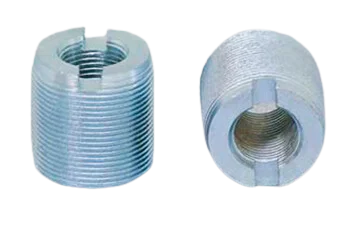
The Phoenix USA 1.4″ x 3/4″ x 1-3/8″ Left Thread Stud Extender (PN1475LTX) is a specialized component engineered to assist in the safe and secure installation of Phoenix USA wheel simulator kits, including the N252, N552, and N259 series. This extender adds 1.4 inches of length to your vehicle’s existing wheel studs, ensuring proper thread engagement when mounting simulators. With a left-hand internal thread, this part is designed for use in applications that require reverse-threaded extenders. Built with durability in mind, it helps achieve correct fitment and enhances the reliability and safety of your wheel simulator installation.
KEY FEATURES AND BENEFITS:
- Critical for Simulator Mounting: Provides additional stud length needed for secure installation of Phoenix USA N252, N552, and N259 wheel simulator kits.
- Ensures Proper Thread Engagement: Increases thread contact area for lug nuts, supporting secure and stable simulator attachment.
- Left-Hand Thread Design: Specifically crafted with left-hand internal threading for compatibility with select wheel assemblies.
- High-Strength Construction: Made from durable steel materials, capable of withstanding operational stress and wear.
- Reliable Fitment: Engineered to match the precise dimensions required for Phoenix USA kits, ensuring easy and accurate installation.
SPECIFICATIONS:
- Part Number: PN1475LTX
- Manufacturer: Phoenix USA
- Height: 1.4 inches (35.56 mm)
- Inner Diameter/Thread Size: 3/4″ (Left-Hand Thread)
- Outer Diameter: 1-3/8″ (34.93 mm)
- Material: Steel (typically corrosion-resistant coated)
- Compatibility: Phoenix USA N252, N552, N259 Wheel Simulator Kits
- Thread Orientation: Left-hand
- Sold: Individually
HOW TO USE:
- Prepare the Wheel Studs: Clean the existing wheel studs to ensure proper threading and secure attachment of the extender.
- Align the Extender: Position the PN1475LTX extender over the correct stud, ensuring the left-hand threads are properly aligned.
- Thread the Extender: Rotate the extender counterclockwise (due to left-hand threading) onto the existing stud until fully seated.
- Tighten Securely: Using a suitable wrench or hand tool, tighten the extender firmly without over-torquing to avoid damaging threads.
- Install the Wheel Simulator: Once all extenders are installed, position the wheel simulator according to the kit instructions.
- Secure with Lug Nuts: Attach the wheel simulator using appropriate lug nuts and tighten in a star pattern to distribute pressure evenly.
- Check Torque: Use a torque wrench to confirm the lug nuts meet the manufacturer’s specified torque values. Re-check after initial driving.
BENEFITS OF USING THE PHOENIX USA 1.4″ X 3/4″ X 1-3/8″ LEFT THREAD STUD EXTENDER (PN1475LTX):
- Improves the safety and reliability of Phoenix USA wheel simulator installations by ensuring proper thread engagement.
- Tailored specifically for use with left-threaded applications found in N252, N552, and N259 series kits.
- Reduces the risk of loosening or detachment during operation through precise fit and robust design.
- Enhances ease of installation and alignment for optimal aesthetic and mechanical results.
- Offers a cost-effective solution by being available for individual purchase and targeted replacement.
FEATURES:
- 1.4″ Height: Adds the necessary extension for secure simulator mounting.
- 3/4″ Left-Hand Thread: Provides reverse-threaded compatibility for specific axle assemblies.
- 1-3/8″ Outer Diameter: Matches the simulator’s mounting dimensions for reliable fitment.
- Steel Construction: Built to endure torque and vibration during regular vehicle operation.
- Kit-Specific Design: Intended exclusively for use with Phoenix USA N252, N552, and N259 kits.
- Sold Individually: Enables flexible purchasing based on your vehicle’s specific needs.

Reviews
There are no reviews yet.